


RFID Print-and-Encode Process: How Smart Labels Are Created
Understanding the RFID Print-and-Encode Process
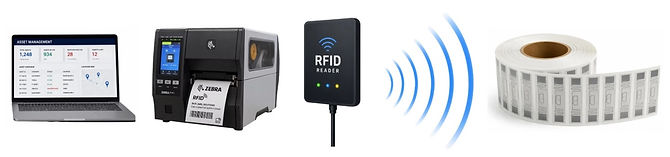
RFID technology does more than print labels, it creates intelligent labels capable of storing digital information that can be read wirelessly throughout the supply chain. During the print-and-encode process, an RFID printer prints human-readable information and barcodes while simultaneously programming the embedded RFID chip with unique electronic data.
This combination of visible and digital information allows businesses to automate inventory tracking, improve accuracy, and gain real-time visibility across manufacturing, warehousing, distribution, and retail operations.
NEED RFID LABELS FOR YOUR PRINT-AND-ENCODE SYSTEM?
Tell us your printer model, label size, and application.
What Is an RFID Print-and-Encode Process?
The RFID print-and-encode process combines two operations into a single step:
-
Printing – The printer applies text, graphics, barcodes, logos, or other information onto the label surface using thermal transfer or direct thermal printing.
-
Encoding – At the same time, the printer writes electronic data to the RFID chip embedded inside the label.
After encoding, the printer immediately verifies that the data was successfully written before the label is released.
The result is a single label that can be read visually by people, scanned with barcode readers, and identified wirelessly by RFID readers.
Components of an RFID Label
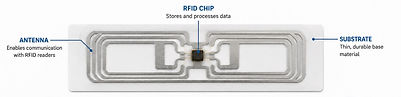
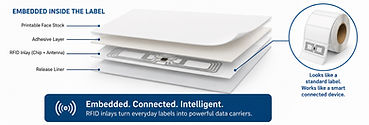
Every RFID thermal transfer label contains several important components:
-
Printable face stock
-
Embedded RFID inlay
-
RFID microchip
-
RFID antenna
-
Adhesive
-
Release liner
The RFID inlay is positioned beneath the printable surface, allowing the label to look like a standard shipping or product label while containing advanced tracking capabilities.
Step 1: Label Design
The process begins by creating the label layout.
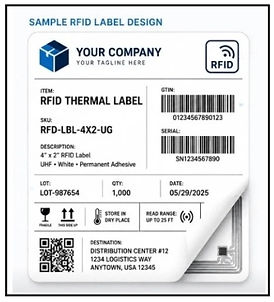
Typical printed information includes:
-
Company logo
-
Product description
-
SKU
-
Barcode
-
Shipping information
-
Lot number
-
Expiration date
-
Human-readable text
-
Compliance markings
The design is created using label design software compatible with RFID-enabled printers.
Step 2: Load Blank RFID Labels
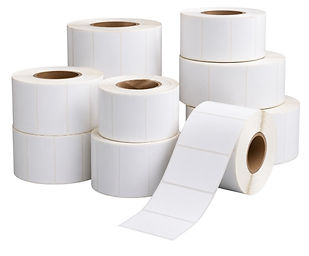
Blank RFID labels are loaded into an RFID-capable thermal transfer printer.
These labels already contain an embedded RFID chip and antenna but have not yet been programmed.
Each RFID chip is initially blank and ready to receive unique data during encoding.
Step 3: Generate Unique RFID Data
Before printing begins, the system generates the information that will be stored on the RFID chip.
Common encoded data includes:
-
Electronic Product Code (EPC)
-
Serialized identifiers
-
Product numbers
-
Asset IDs
-
Shipping identifiers
-
Manufacturing data
-
Customer-specific information
-
User memory (when applicable)
Each label receives a unique electronic identity.
Step 4: Print the Label
The printer applies all visible information to the label surface.
Printed elements may include:
-
Barcodes
-
QR Codes
-
Product names
-
Shipping addresses
-
Serial numbers
-
Lot codes
-
Graphics
-
Compliance information
This information allows the label to function with traditional barcode systems while supporting RFID technology.

Step 5: Encode the RFID Chip
As the label moves through the printer, an internal RFID encoder transmits radio signals to the embedded chip.
The printer writes the selected data directly into the chip's memory.
Unlike barcodes, the encoded information is invisible to the human eye but can be read by RFID readers without direct line of sight.
Step 6: Verify the Encoding
After writing the data, the printer automatically verifies that the RFID chip was successfully programmed.
Verification confirms:
-
Data accuracy
-
Successful communication
-
Proper encoding
-
Functional RFID chip
If a tag fails verification, it can be marked as unusable or removed from production, preventing faulty labels from entering your supply chain.

Why Encoding Verification Matters
Verification is one of the most important steps in the RFID process.
Without proper verification, businesses may experience:
-
Unreadable RFID tags
-
Shipping delays
-
Inventory inaccuracies
-
Customer chargebacks
-
Compliance failures
-
Lost inventory visibility
Reliable encoding verification helps ensure every label performs as expected.
What Is an Electronic Product Code (EPC)?
Most RFID labels store an Electronic Product Code (EPC).
An EPC is a globally recognized unique identifier that allows businesses to distinguish one item from another.
Unlike a standard barcode, each EPC identifies an individual product rather than simply identifying a product type.
This enables precise tracking throughout the supply chain.
Why RFID Is More Powerful Than Barcode Printing Alone
Traditional barcode labels require employees to locate and scan each label individually.
RFID-enabled labels allow readers to identify multiple items simultaneously, even through cartons, pallets, or containers.
This enables:
-
Faster receiving
-
Faster shipping
-
Improved inventory counts
-
Automated asset tracking
-
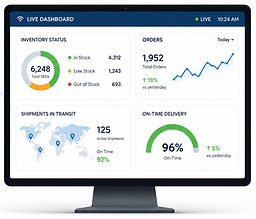
Real-time product visibility
-
Reduced manual labor

Industries Using RFID Print-and-Encode Technology
RFID print-and-encode solutions are used across many industries, including:
-
Warehousing
-
Distribution Centers
-
Manufacturing
-
Logistics
-
Retail
-
Healthcare
-
Pharmaceutical Manufacturing
-
Food & Beverage
-
Automotive
-
Aerospace
-
Cold Storage
-
Third-Party Logistics (3PL)
-
Asset Management

Benefits of RFID Print-and-Encode
Organizations implementing RFID print-and-encode systems often achieve:
-
Faster label production
-
Higher inventory accuracy
-
Automated product identification
-
Real-time inventory visibility
-
Reduced labor costs
-
Improved order accuracy
-
Fewer shipping errors
-
Enhanced traceability
-
Better supply chain visibility
-
Improved operational efficiency
Common Print-and-Encode Mistakes
To maximize performance, avoid these common issues:
-
Using labels incompatible with your printer
-
Selecting the wrong RFID inlay
-
Improper printer calibration
-
Incorrect ribbon settings
-
Poor antenna placement
-
Skipping encoding verification
-
Using damaged or low-quality RFID labels
Working with quality RFID labels and properly configured equipment helps ensure consistent results.
Choosing the Right RFID Labels
Successful RFID implementation starts with selecting labels designed for your specific application.
When choosing RFID labels, consider:
-
Label size
-
RFID inlay performance
-
Surface material
-
Environmental conditions
-
Printer compatibility
-
Read distance requirements
-
Adhesive type
-
Regulatory compliance
The right combination of label, inlay, and printer helps deliver reliable performance from production through final delivery.
The Bottom Line
The RFID print-and-encode process transforms a standard label into a smart, connected asset that can be tracked throughout its lifecycle. By combining printed information with digitally encoded RFID data, organizations can automate identification, improve inventory accuracy, reduce manual processes, and gain real-time visibility across the supply chain.
Whether you're implementing RFID for the first time or expanding an existing system, understanding the print-and-encode process is essential to building a reliable, efficient RFID solution.
Ready to Print and Encode with Confidence?
DockitRFID supplies high-quality RFID thermal transfer labels engineered for dependable print-and-encode performance with leading RFID printers. Our factory-direct labels are designed to help manufacturers, warehouses, distributors, and retailers achieve accurate encoding, reliable reads, and consistent results—so every smart label is ready to perform from the moment it's printed.
PRINT. ENCODE. DEPLOY.
